Explore IaC security auditing techniques to detect configuration risks, enforce least privilege, and secure Terraform and CloudFormation deployments.
Your cloud didn’t get misconfigured at 2 a.m. in the console. It got misconfigured weeks earlier, in a pull request that three people approved. That’s the uncomfortable truth about Infrastructure as Code security. When a single module can spin up hundreds of resources, one careless line gets replicated at scale.
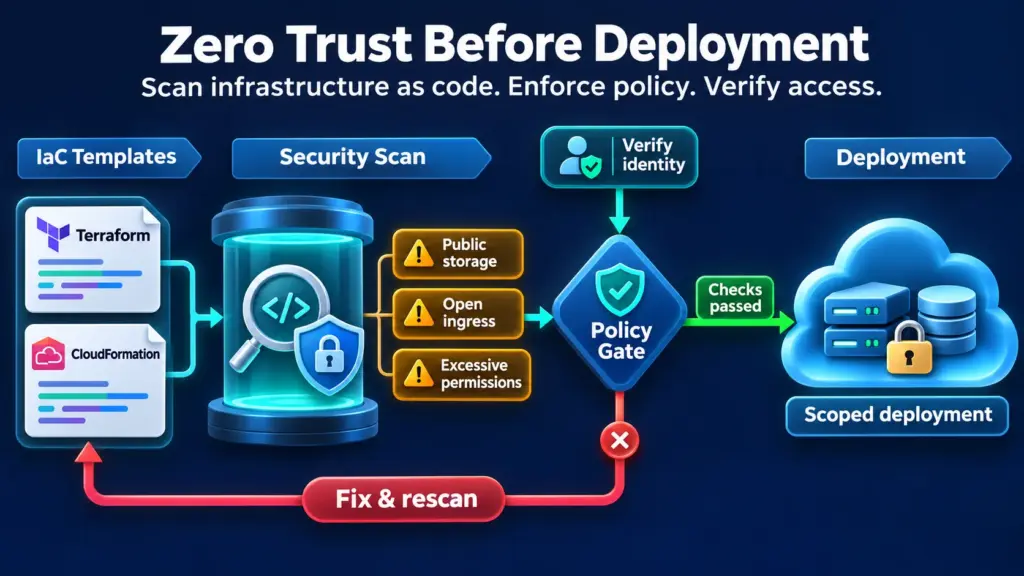
Zero Trust offers a better stance. Don’t trust a template because a teammate wrote it. Don’t trust a pipeline because it’s internal. Verify everything, every time, before anything reaches production. This post covers how to secure Infrastructure as Code with that mindset, what to look for in Terraform and CloudFormation, and how to build checks that hold up.
Infrastructure as Code (IaC) security is the practice of reviewing, testing, and enforcing safe settings in the templates that define your cloud resources, before those resources exist. You’re securing the blueprint, not just the building.
That shift matters. Traditional cloud reviews happen after deployment, when a scanner flags an open storage bucket that’s been exposed for days. Good Infrastructure as Code security moves that check left, into code review and the CI pipeline, where a fix costs minutes instead of an incident.
It also gives you something runtime tools can’t: a paper trail. Every change is versioned, attributed, and reviewable. Auditors love that.
Zero Trust rests on three habits: verify explicitly, grant least privilege, and assume breach. Each one maps cleanly onto infrastructure code.
Verify explicitly means no template deploys without automated checks, no matter who wrote it. Least privilege means IAM roles and network rules are scoped tightly in the code itself, not loosened later when something breaks. Assume breach means you design for blast radius, so one compromised credential can’t touch everything.
That’s what Zero Trust cloud security looks like in practice. It isn’t a product you buy. It’s a set of rules your templates must satisfy before they’re allowed to run. Teams that work this way also find cloud infrastructure compliance far less painful, because the evidence is produced by the pipeline itself.
Most incidents trace back to a short list of repeat offenders:
A Terraform misconfiguration can be especially sneaky because the state file may hold sensitive values, and unencrypted remote state becomes a target in itself. CloudFormation has its own traps, like overly permissive default parameters and nested stacks that inherit broad roles.
Here’s how to detect misconfigurations in Terraform early. Your Terraform configuration files are plain text, which means they’re scannable before a single resource is created.
Tools like Checkov, tfsec, Trivy, and Terrascan cover most Terraform security ground. Pick one, tune it, and make it a required check.
The approach is the same. The tooling differs. cfn-lint catches syntax and best-practice issues, while cfn-nag and Checkov look for risky patterns such as open ingress rules or unencrypted volumes. AWS CloudFormation Guard lets you write rules as code, which leads to the next layer.
Review changesets before execution, too. A changeset shows exactly what will be modified or replaced, and that’s where an innocent-looking update can quietly swap a private resource for a public one.
Scanners find problems. Security policy enforcement decides what happens next. With policy as code, using Open Policy Agent, Sentinel, or Guard, you write rules once and apply them across every repository. No exceptions by email.
Then close the loop at runtime. Cloud security posture management compares what’s deployed against what your code said should be deployed. When someone edits a resource by hand in the console, drift detection flags it. Pre-deployment scans prevent. Posture monitoring verifies. Neither is enough alone.
Begin with one high-risk repository, set a baseline of rules around public exposure, encryption, and IAM, and enforce them in the pipeline. Feed findings into cloud security posture management reporting, then expand to other teams. Map your rules to the frameworks behind your cloud infrastructure compliance duties, such as CIS, SOC 2, or ISO 27001.
Ownership matters as much as tooling. Give platform teams the paved road, with secure modules developers can reuse, so the safe option is also the easy one.
IaC makes infrastructure repeatable, and that cuts both ways. Secure patterns spread fast, and so do mistakes. Applying Zero Trust cloud security to your templates turns every pull request into a checkpoint. Start small, automate the checks, and let the pipeline do the verifying.
Public storage, wide-open security groups, wildcard IAM permissions, disabled encryption, and secrets sitting in variables or state files. Most of these are easy to catch with automated Terraform security scans before deployment.
Lint them with cfn-lint, scan them with cfn-nag or Checkov, and write custom rules in CloudFormation Guard. Then review changesets before execution so you see exactly what’s about to change.
It’s an insecure or non-compliant setting written into a template, like an open port or an unencrypted database. Because the code gets reused, one Terraform misconfiguration repeats everywhere the template is deployed.
Every template gets verified by automated checks, permissions follow least privilege, and designs assume a credential could be compromised. No change is trusted just because it came from inside the team.
Checkov, tfsec, Trivy, and Terrascan are common choices. Pair them with policy engines like Open Policy Agent or Sentinel for consistent security policy enforcement.